
What you need
- A Linux desktop with a recent Chrome or Chromium build (120+).
-
The
unziputility, or any GUI archive manager (file-roller,ark, etc.). - A Google account you are willing to sign into.
- The extension
.zip— download it here if you haven't yet. - About 10–15 minutes.
1. Unzip the extension
-
Open a terminal and unzip the file into a stable location:
The finalmkdir -p ~/.local/share/ai-scapes-extension unzip ~/Downloads/ai-scapes-extension.zip \ -d ~/.local/share/ai-scapes-extension ls ~/.local/share/ai-scapes-extension/manifest.jsonlsshould print the manifest path. If it says "No such file" you likely have a nested folder — adjust the path so it points to the directory containingmanifest.json. -
Prefer a GUI archive manager? Right-click the
.zipin your file manager and choose Extract here. Move the resulting folder into~/.local/share/(or any path that survives reboots).
ls proves manifest.json is at the top level.
Snap users. If Chrome / Chromium is installed via
Snap, it runs in a confined sandbox that cannot read arbitrary user
directories. Use a path that Snap can access — for example
~/snap/chromium/common/ai-scapes-extension/ for
Chromium-snap, or
~/.config/google-chrome/External Extensions/ for the
Google-supplied .deb build.
2. Open Chrome's extensions page
- Open Chrome (or Chromium).
-
In the address bar, type
chrome://extensionsand press Enter. - Toggle Developer mode ON in the top-right.
chrome://extensions).3. Load the unpacked extension
- Click Load unpacked.
-
In the file picker, navigate to the folder you unzipped in step 1
(e.g.
~/.local/share/ai-scapes-extension/) and click Open. -
The AI-scapes experiment card should appear. If
you see a red error about
manifest.json, the folder you picked is one level above the manifest — re-select.
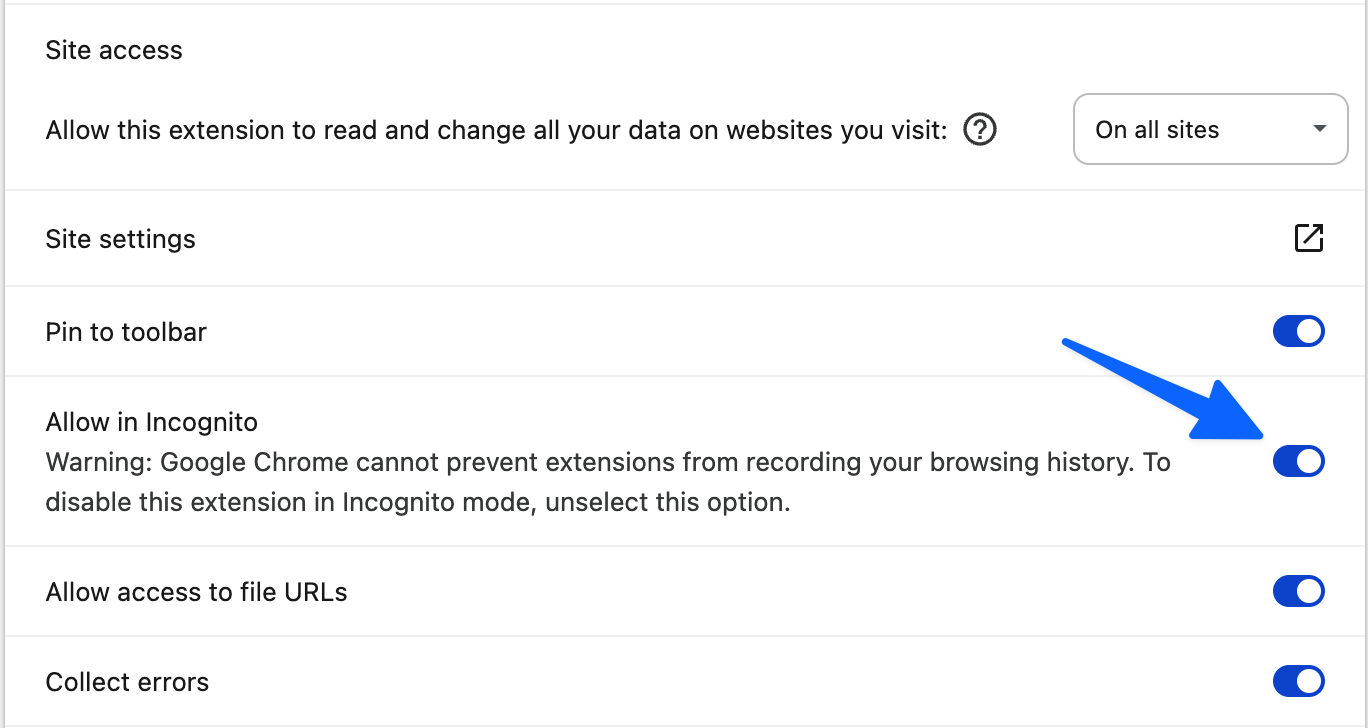
4. Allow the extension in Incognito
- On the AI-scapes card, click Details.
- Switch Allow in Incognito ON.
5. Start the study
-
Click the puzzle-piece icon in the toolbar and pin
AI-scapes experiment.
Pinning the extension makes the icon visible in the toolbar. - Click the AI-scapes icon to start the consent + setup flow.
- Click Start study. The extension opens four search windows in sequence and closes them as each search completes.
Wayland note. On Wayland desktops some window
managers ignore programmatic
focus requests. If a
search window opens but does not come to the front, click on it
once — the extension will continue from there.
Troubleshooting
"Manifest file is missing or unreadable"
Chrome could not see manifest.json at the top of the
folder. Run ls /path/to/folder/manifest.json in a
terminal — if that fails, you picked a parent directory. Re-select
the directory whose ls directly lists
manifest.json.
The extension card stays empty / doesn't appear
On distros that ship Chromium via Snap or Flatpak, the browser may not have permission to read the path you chose. Move the unzipped folder under your home directory's Snap / Flatpak-visible area (see the callout above) and re-load.
I want to uninstall later
Return to chrome://extensions and click
Remove. Then delete the unzipped folder if you no
longer need it.